


革新を超えるゲーム体験
Evnia OLED ゲーミングモニターの正確な色再現性には、誰もが目を奪われるはず。革新的な Ambiglow がゲーミング環境の常識を再定義し、ゲーム機器だけでなく、ゲーム体験をもレベルアップします。
革新を超えるゲーム体験
Evnia 8000
42(41.54 インチ/105.5 cm 対角)
3840 x 2160(4K UHD)

深みのある黒のディテールでリアルな映像を実現する OLED ディスプレイ
このフィリップス OLED ディスプレイは、より広い視野角と、卓越したリアルな映像を実現します。深みのある黒はシャドウとハイライトのディテールを正確に再現。驚異的な映像体験を提供します。

デバイスとモニター間の入力遅延を低減
入力遅延とは、接続されたデバイスで操作を行ってから、その結果が画面に表示されるまでの経過時間です。低遅延により、デバイスからコマンド入力した結果がモニターに表示されるまでの遅延時間が短縮されるため、ハイペースで展開されるゲームなど、何よりも速度が重要視されるビデオゲームのプレイに効果的です。
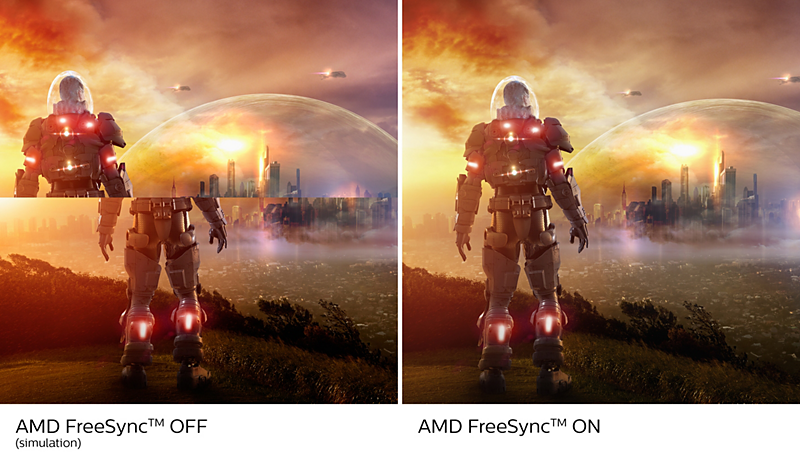
AMD FreeSync™ Premium。ティアリングのないスムーズなゲーミング
ゲームをプレイするのに、動きがぎこちなかったり、映像が壊れていたのでは話になりません。AMD FreeSync™ Premium は本格的なゲーマーに、最高の性能でティアリングのないスムーズなゲームプレイ体験を提供。高リフレッシュレート、低フレームレート補正、低遅延で、妥協せず思う存分楽しめます。
技術仕様
レビュー
1.0
5 中
1
レビュー
kriskris7676
11/01/2025

Singapore
Frustrating Design and Poor Instructions
The Philips 42M2N8900 OLED gaming monitor has been a deeply frustrating experience, falling far short of expectations due to its poorly designed pixel refresh process and lack of clear instructions. One of the most significant issues is the mandatory pixel refresh process, which activates at inconvenient times and renders the monitor completely unusable until it’s completed. The user manual lacks sufficient detail, making it challenging to understand how to handle this process. For instance, when the pixel refresh dialog box appears, the word "Proceed" is displayed in the bottom left corner. However, navigating to it is impossible, leaving users confused about whether they need to click "Proceed" or if the process runs automatically. It’s unclear why the word "Proceed" is even there if it can’t be interacted with. The manual mentions the LED blinking during the refresh, but it doesn’t specify where the LED is located. After some trial and error—and a reflection on my glass tabletop—I discovered that the blinking LED is at the bottom right corner of the monitor. According to the manual, the pixel refresh should take around six minutes, but even after waiting for an hour, the monitor remained stuck in the refresh state. Ultimately, I had to manually turn off the monitor using the red button on the remote control and then turn it back on to regain functionality. This step is not mentioned anywhere in the instructions. If users are required to take such action, it should be explicitly spelled out in the dialog box or the manual. For instance, the dialog box should clearly instruct users to turn the monitor off and on again after six minutes if the refresh doesn’t complete automatically. For a premium product, these oversights are unacceptable. The entire process is convoluted, poorly communicated, and detracts from the overall usability of the monitor. I cannot recommend the Philips 42M2N8900 OLED monitor given the frustration it has caused. Avoid this product at all cost.
気に入らない点
Pixel refresh process activates at inconvenient times, making the monitor unusable. User manual lacks sufficient detail, making the process unclear. "Proceed" button in the dialog box is impossible to navigate to, leaving users confused. LED blinking during refresh is not clearly explained, and its location is ambiguous. Pixel refresh process takes longer than stated (over an hour instead of six minutes).
これは Gaming Monitor 42M2N8900 OLED gaming monitor に対するレビューです
使用日 2024-12-10
これは Gaming Monitor 42M2N8900 OLED gaming monitor に対するレビューです
使用日 2024-12-10
最適な出力性能を得るために、このフィリップスディスプレイの最高解像度とリフレッシュレートに対応するグラフィックカードを必ず使用してください。
応答時間値は SmartResponse に相当
CIE1976 に基づく DCI-P3 範囲
NTSC 領域(CIE1976)
sRGB 領域(CIE 1931)
CIE1976 に基づく Adobe RGB 範囲
USB-C の電源供給および充電機能については、お使いのノート PC/デバイスが USB-C 標準の電源供給仕様に対応している必要があります。詳細は、ノート PC のユーザーマニュアルを参照していただくか、メーカーまでお問い合わせください。
USB-C ビデオ転送には、お使いのノート PC またはデバイスで USB-C DP Alt モードへの対応が必要
2020 Advanced Micro Devices, Inc. All rights reserved. AMD、AMD Arrow ロゴ、AMD FreeSync™ およびその組み合わせは、Advanced Micro Devices, Inc. の商標です。その他の名称は識別のみを目的として記載されており、各企業の商標です。
実際のモニターは図と異なる場合があります。